
Plant Brainrot Simulator Mutations Guide
Learn Plant Brainrot Simulator mutations: what each mutation type does, which fruit gives it, how Shadow/Darkness works, and when to use Reversion Fruit.
I run the wiki, so I should sound wise about Plant Brainrot Simulator mutations.
I’m not. Not at first, anyway.
I used what I thought was a “seed mutation” really early, then found out merging wants the same plant type lined up. I regretted it so much I literally made a new account. Yeah.
So here’s my main rule for new players: if you’re still swapping plants all the time, save your rare fruits. Especially Bomb Fruit and Darkness (Shadow) Fruit. They’re hard to get, and they matter later.
This page keeps it simple: mutation types, which fruit gives what, what Shadow mutation does, and when to use Reversion Fruit.
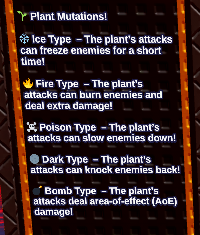
Plant Brainrot Simulator mutation types (quick list)
Here’s the in-game list screenshot so you can match names fast:
What mutations are (quick)
A mutation is a special effect you add to a plant. It changes how the plant attacks.
Most mutations help with one of these:
- Stop enemies from reaching you (control)
- Clear big groups (AOE)
- Add extra damage over time (burn)
- Undo a mistake (Reversion Fruit)
Mutation fruits: which fruit gives which mutation?
Mutations are tied to fruits. Each mutation fruit generally corresponds to one mutation type:
| Fruit | Mutation type | What it does (summary) |
|---|---|---|
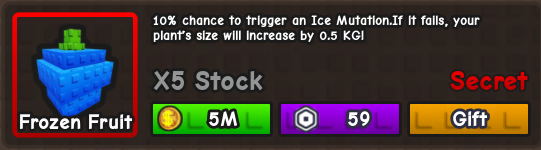 Frozen Fruit Frozen Fruit | Frozen | Can freeze enemies briefly (control) |
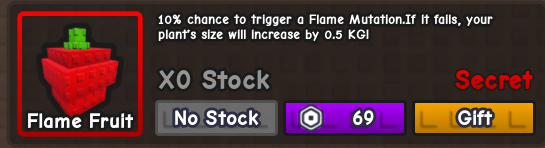 Flame Fruit Flame Fruit | Fire / Flame | Can burn enemies and add extra damage |
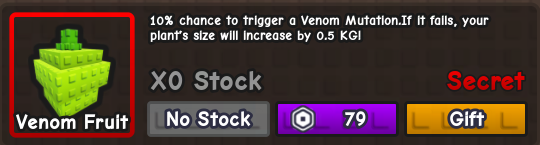 Venom Fruit Venom Fruit | Poison / Venom | Can slow enemies down (control / debuff) |
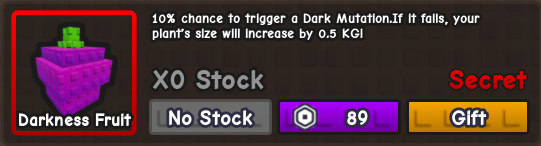 Darkness Fruit Darkness Fruit | Dark / Shadow | Can knock enemies back (control), often used for high impact |
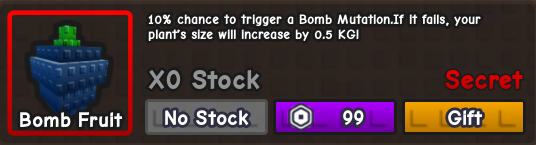 Bomb Fruit Bomb Fruit | Bomb | Deals area-of-effect (AOE) damage |
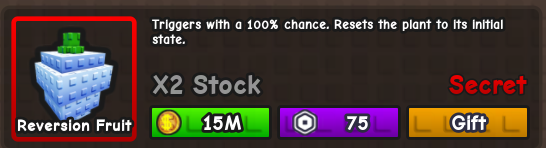 Reversion Fruit Reversion Fruit | Reversion | Removes a mutation and reverts a plant back to normal |
Fruits also show up from events/updates (and sometimes codes). If you’re just looking for freebies, the fastest check is the codes page: /codes.
Which mutation should you pick? (my simple cheat sheet)
If you’re stuck, pick based on the problem you have right now:
- Frozen: enemies keep reaching you. You need a “pause” button.
- Venom / Poison: you want enemies to move slower. Works in almost any run.
- Flame / Fire: you want extra damage over time (feels good on fast attackers).
- Bomb: you’re getting swarmed by big groups. AOE helps.
- Dark / Shadow (Shadow mutation): knockback. This can save runs, but the fruit is rare.
- Reversion: undo. Use it when you messed up a mutation or want to switch builds.
My new-player advice: save Bomb Fruit and Darkness Fruit for later. Spend them when you have a plant you know you’re keeping.
When should you mutate your plants? (best timing)
Don’t mutate too early if you keep replacing plants.
If you want a simple rule: mutate when the plant feels like a keeper (a lot of players wait until around 5 stars).
Reversion Fruit: how it works (and why it matters)
Reversion Fruit is the mutation undo button. You use it on a mutated plant, and it reverts the plant back to its original (non-mutated) state.
Reversion is useful when:
- You accidentally applied the wrong mutation fruit
- You got a mutation you don’t want for your build
- You want to switch to a different mutation type later
It’s basically what lets you experiment without permanently locking in a bad outcome.
FAQ: Plant Brainrot Simulator mutations
Can plants mutate when merging/fusing?
Depending on the current update, the game may add chances for mutations to appear during certain actions (like merging/upgrading). If you hate that kind of randomness, mutate later and keep Reversion Fruit as your safety net.
What if I mutated too early?
Use Reversion Fruit to undo it, then wait until you have a plant you’re actually keeping long-term before you try again.
Does mutation fail give weight (+0.5kg)?
Some players report that failed mutation attempts can grant a small weight gain (often described as +0.5kg per fail), and that repeating “mutate -> revert” can increase plant weight over time.
This behavior sounds patch-dependent. If your current version shows a weight reward in-game, test it with a throwaway plant first - don’t burn rare fruits just to find out it got changed.
Is there a quick “weight loop” with Reversion Fruit?
The loop people talk about is basically: mutate, revert, repeat - but only if your version actually rewards weight for it. If your UI doesn’t show anything, don’t force it. The safest rule still holds: trust the in-game UI/tooltips for your current version.